Accounts
Can I use a VoIP phone (Voice over Internet Protocol phone) to create my account?
No. Please use a standard cell phone or landline when creating your account. We do not accept VoIP phone numbers because they can be auto-generated in large numbers by hackers.
How do I change my email address or password?
Please email the Helpdesk to change the email address or password associated with your Fornax account.
Server Sessions and Connectivity
I was logged out while having a running job. What happens to it?
Being logged-in and having a running job or server are independent. An active Server Session is running in the cloud regardless of whether you logged in or not (See JupyterLab Session Information). To access that active Server Session (to stop it or modify it), you need to be logged in. So your running job will not be affected.
Why is my server unavailable or unreachable?
If you see a pop-up dialog like the one below, it means that your server session was automatically terminated.
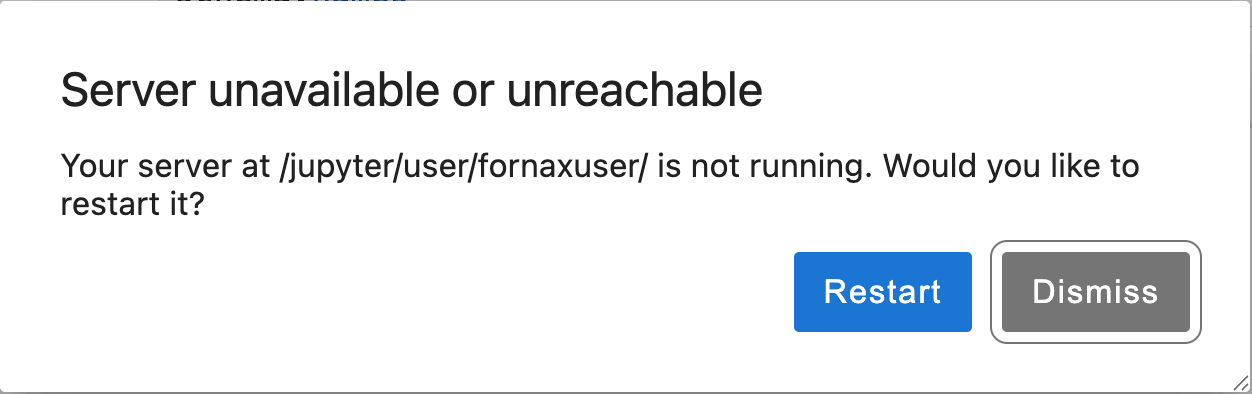
The “Server unavailable or unreachable” dialog appears when your session has been automatically terminated.
This can happen for two reasons: your server was either culled or it ran out of memory. There’s no way to determine which was the cause after the server shuts down, but you can make an educated guess based on what you had running.
Sessions may be culled if they appear inactive or reach the maximum time limit. JupyterLab Session Information explains the details. Sessions executing code might still appear inactive if, for example, they wait a long time to receive data. The Keep-Alive feature can be used to prevent culling due to inactivity. However, keep in mind that your credits are charged while your server is running, even if it is inactive.
A session will run out of memory if the code or task(s) being executed require more RAM than the server has. Starting a new session with a larger server size will increase the available RAM.
How long is the period of inactivity before a session gets culled?
It is set to 15 minutes, but it can take a few minutes longer for the culling service to be triggered.
If my Internet connection goes away or is intermittent, what happens to the running notebook?
If you have a running job and your Internet is disrupted, the job should continue to run as long as the session does not expire (See JupyterLab Session Information). You can connect to a running session using the same browser or different browser. You can even connect to the same session from different machines.
Software and Environments
What software is pre-installed?
Software Overview lists notable packages that are pre-installed. These and many other pre-installed packages are organized into several environments. Pre-installed Environments describes how to find complete lists of the packages in each environment and how to search for a particular package of interest.
How do I install compilers or other packages that require root access?
We recommend installing these packages from conda, using miniconda, which avoids the need for root access.
See Compilers and General Software for more information.
For security reasons, commands cannot be run using sudo because users don’t have full root access.
How do I fix version conflicts when installing software?
Version conflicts occur when two packages need incompatible versions of the same dependency.
For example, one package might require numpy<2 while another needs numpy>=2.
To fix this, try creating a new environment, which isolates your packages from the pre-installed ones and gives the dependency solver a fresh start.
Note that conda’s solver can be better than pip’s at finding a consistent set of package versions across dependencies.
If two packages you need are truly incompatible, contact their maintainers to see if the conflict can be resolved upstream.
Files and Storage
What are the pre-installed directories and files used for?
You can store files and data in the directories ~/ (home directory), ~/s3-storage, ~/shared-storage, and /scratch.
See Data Storage for details.
The directory ~/fornax-notebooks contains demo and tutorial notebooks.
It is read-only.
See Notebooks in the Console for details.
$ENV_DIR and $USER_ENV_DIR are aliases to directories where environments are stored.
$LOCK_DIR is an alias to a directory where you’ll find lists of the software installed in the built-in environments.
See Compute Environments for details.
The file ~/.profile is an initialization script that runs when a terminal session starts.
See Terminal Initialization scripts for details.
How do I upload or download files and directories?
There are two ways to move files in and out of the Fornax Science Console: connect with an external storage solution, or upload and download to your local computer Examples of external storage include GitHub repositories, cloud storage buckets, Box, and Google Drive. To use external storage, refer to the documentation for your chosen service. See also Data Access from within Fornax.
To upload files from your local computer:
Navigate to your destination directory using the File Browser panel on the left side of the Science Console.
Click the Upload Files button (upward-arrow icon) in the File Browser toolbar.
Select the file(s) you want to upload. Hold down the Shift key to select multiple files. To upload a directory, zip or tar it first (example below).
Click Open.
To download a file to your local computer:
Navigate to the file in the File Browser, right-click it, and select Download.
Typically, the file will be saved to your downloads folder or you will be prompted to choose a location. This depends on your browser settings.
Only one file can be downloaded at a time.
To download multiple files or an entire directory, first combine them into a single archive file using tar from the terminal, then download the archive file using the steps above.
Here’s a tar example that combines two files and a directory into an archive file called my-files.tar.gz:
tar -czvf my-files.tar.gz my-file1 my-file2 my-directory/What is the difference between saving and downloading a file?
“Saving” a file will place it in a location in your Fornax storage.
To save a file, click on your notebook in your directory on the left side of the screen.
Then go to the main menu and select File → Save.
There are a few save options.
Alternatively you can click the image of the disk under the tab on an open file.
“Downloading” a file will move a copy to your local machine.
To download a file, click on your notebook in your directory on the left side of the screen.
Then go to the main menu and select File → Download.
You can also right click on the file name and select Download.
Tools
How do I use Git from Fornax?
If you want to clone notebooks or code from a Git repository (repo) into the Fornax Science Console, you can use either the git command-line tool from the terminal or the Git extension UI.
Basic instructions to get started using Git on Fornax are below, including details that are specific to Fornax.
For a detailed tutorial about how to use Git in any context, see https://
One-time setup
To set up Git on Fornax for the first time, configure your username and email by opening a terminal and running the following commands:
# Use the username and email associated with your Git account (not your Fornax account).
git config --global user.name "username"
git config --global user.email "your.email@example.com"
To be able to read (or clone) a private repo, or to write to any repo, you will need to use credentials. You can either use your username and password or an access token, both of which you would set up through your Git provider (for example, GitHub).
You can reduce the number of times you need to enter your credentials by configuring git to cache them.
In a terminal on Fornax, execute the following command:
# Tell git to cache your credentials for all repos.
# To do this for a single repo instead, cd into the repo directory and remove '--global' before running the command.
git config --global credential.helper cache
Clone a repository
After setting up your credentials (if necessary; see above), you can clone a repo using a command similar to one of the following.
Option 1: Clone without passing credentials. (You will be asked to provide them later if/when doing something that requires them.)
git clone https://github.com/{repo-owner}/{repo-name}Option 2: Pass your personal access token while cloning.
git clone https://{your-token}@github.com/{repo-owner}/{repo-name}Can I use AI command line interfaces on Fornax?
Yes! AI coding assistants such as Claude Code and OpenAI Codex work on Fornax, as do others. Just open a terminal, follow the install instructions for your favorite AI assistant, and you should be off and running.
Keep in mind that these tools send your prompts, and often the contents of your files, to an external service. You are responsible for the account, any usage costs, and for making sure the data you share is appropriate to send off-platform.
Use Cases
Can I run high-performance computing (HPC) workflows?
Although the Fornax Science Console isn’t a traditional HPC system, it provides many similar features and benefits. By selecting a very large server size, users can run highly parallelized workflows on a single node and achieve performance that often eliminates the need for a multi-node HPC system. In addition to the substantial compute power for data processing, the high network bandwidth enables massively parallel access to cloud-hosted data. Fornax also provides built-in TB-scale temporary and long-term storage options, giving users several choices for reading and writing large datasets.
Users have access to the command line where they can install software and launch jobs from scripts.
Unlike typical HPC systems, Fornax does not have a job scheduler. We do plan to add support for batch or asynchronous job submission in a future release.
Be aware that server sessions can be automatically terminated under certain circumstances. See JupyterLab Session Information for details.
Can I use Fornax for exoplanet research?
Yes! Fornax is well-suited for many exoplanet workflows, especially computationally intensive tasks that parallelize well. Atmospheric retrievals are a prime example: tools like petitRADTRANS (pRT) require running thousands of forward models to sample parameter space, which maps naturally onto Fornax’s scalable cloud compute. Exoplanet Retrieval Quickstart is a tutorial for setting up and running a pRT retrieval on Fornax. Similarly, tasks like injection-recovery tests, transit timing analyses across large light curve sets, and population-level modeling all benefit from the ability to spin up many parallel workers.
Fornax is also co-located with NASA archive data on the cloud, making it easy to pull large datasets without the bottleneck of downloading to a local machine. Cloud-hosted NASA mission data are readily accessible at high bandwidth directly from the Fornax Science Console.
Known Bugs
How can I be sure that the files I moved to S3 are complete?
There is a known bug in the ~/s3-storage mount where a copy or move operation can exit early without finishing the write and without warning you that anything went wrong.
We are working on a fix.
In the meantime, always verify that a file was completely written to ~/s3-storage before deleting it from its original location.
Avoid the shell command mv or any other action that deletes the original data before you’ve checked whether the S3 copy is complete.
You can verify copies using checksums. Here is an example:
# Calculate an MD5 checksum for every file in `my-directory`
# and save the checksums to a file called `~/checksums.md5`.
find my-directory -type f -exec md5sum {} + > ~/checksums.md5

# Copy the directory to your S3 bucket storage.
cp -r my-directory ~/s3-storage/

# Verify the files copied to S3 against the saved checksums.
cd ~/s3-storage
md5sum -c ~/checksums.md5
If md5sum -c reports OK for every file, the copy is complete and it’s safe to delete the original.
Why is my HTML or PDF page blank when opened inside JupyterLab with Safari?
This is a known issue in displaying HTML and PDF files inside JupyterLab in Safari. The workaround is to right-click (double finger tap) on the file and select ‘Open in New Browser Tab’.
Why do I get a “403: Forbidden, XSRF cookie does not match POST argument” error when starting a server?
This is a known browser issue. Stale or corrupted cookies stored for the Fornax Science Console site can cause the browser to send a cookie that no longer matches what the server expects, which blocks the request to start your server session.
To fix it, clear the site data for the Fornax Science Console and log in again:
Chrome: Click the tune/padlock icon to the left of the web address, click Site settings, then under the “Usage” section click Clear data.
Firefox: Click the padlock icon to the left of the web address, click Clear cookies and site data…, then click Remove.
Safari: Open Safari → Settings (or Preferences), click the Privacy tab, click Manage Website Data…, search for the Fornax site, select it, and click Remove.
If clearing site data doesn’t help, try updating your browser to the latest version or using a different browser.